
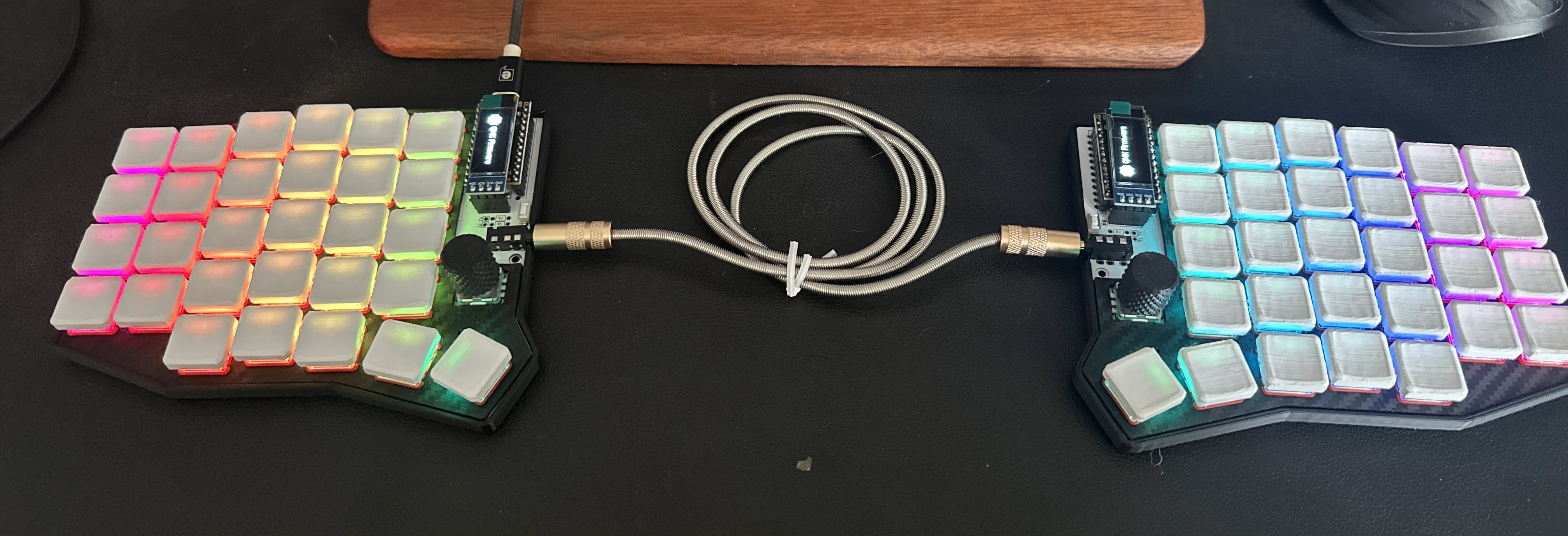
My keyboard doesn’t just send keycodes — it formats code, navigates Neovim panes, manages Tmux sessions, controls the mouse, and autocorrects my worst typos. None of it requires software on the host. It all lives in the firmware.
This is a walkthrough of my QMK keymap for the Sofle v2 Choc: why I made each decision, what each layer does, and the features that changed how I type.
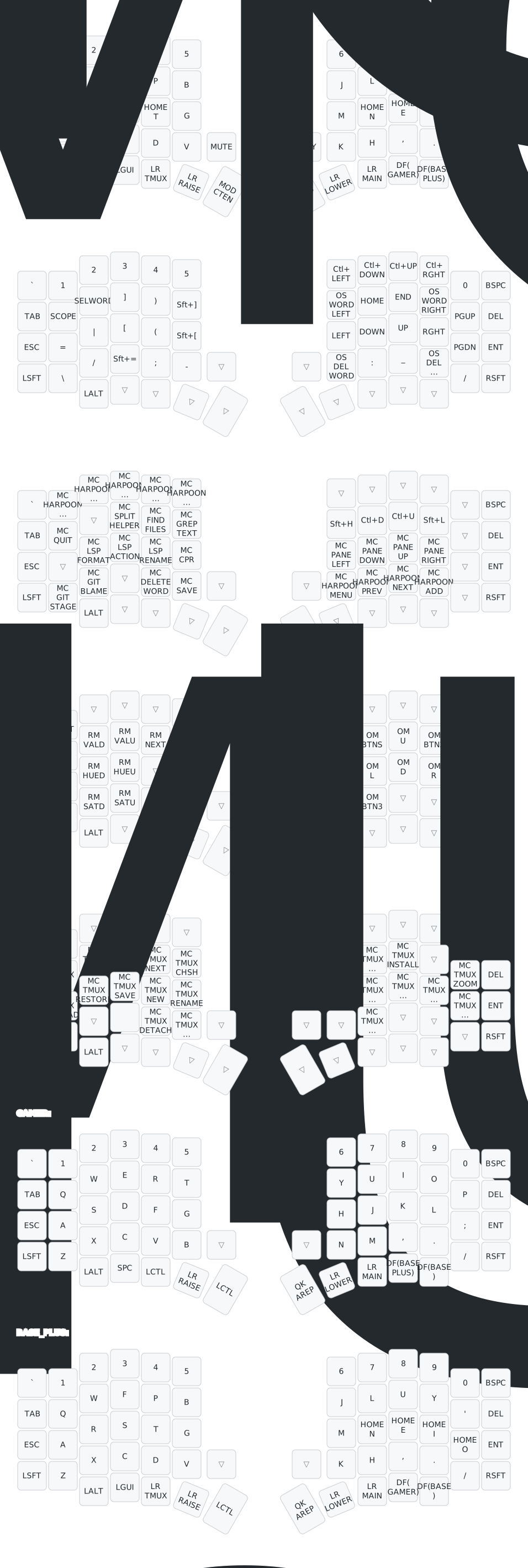
Repository: github.com/arturgoms/qmk-keymap | Full keymap: view SVG
The Keyboard
The Sofle v2 Choc is a 58-key split ergonomic keyboard. Each half sits independently, so your hands rest at shoulder width instead of angled inward toward a single board. After years of a traditional layout, the difference in wrist and shoulder tension was immediate.
Mine runs a RP2040 controller (a Raspberry Pi Pico-compatible chip), which replaced the original Pro Micro. The main benefit: more flash storage for larger keymaps, and USB-C.
The switches are Choc low-profile — about half the height of standard MX switches. The result is a much lower hand position and no need for a wrist rest.
The Layout: Colemak Magic Sturdy
The base layer uses Colemak Magic Sturdy, a variant of Colemak optimized to minimize same-finger bigrams (two keys pressed in sequence by the same finger). It’s a refinement on top of Colemak that improves rolling and reduces awkward stretches.
`    1    2    3    4    5              6    7    8    9    0   Bspc
Tab  Q    W    F    P    B              J    L    U    Y    '   Del
Esc  G/A  A/R  S/S  C/T  G              M   C/N  S/E  A/I  G/O  Ent
Caps Z    X    C    D    V   Mute Play  K    H    ,    .    /   RSft
          LAlt LGui TMUX RAISE OCtl AREP LOWER MAINT GAMER BASE+
               |    Tab  Bspc           Spc   Rep
The letter placement is different from QWERTY, which means a learning curve. For me, it took about three weeks to reach a comfortable typing speed. The ergonomic gain was worth it — same-finger movement dropped noticeably after switching.
Home Row Mods
The most impactful change in my keymap isn’t the layout — it’s home row mods. Each home row key has a dual role: tap it and you get the letter, hold it and you get a modifier. The notation is MODIFIER/LETTER:
G/A A/R S/S C/T C/N S/E A/I G/O
Breaking that down — on Colemak the home row letters are A R S T (left) and N E I O (right), and each gets a modifier assigned in GASC order (Gui, Alt, Shift, Ctrl):
| Key | Tap | Hold |
|---|---|---|
| G/A | A | GUI |
| A/R | R | Alt |
| S/S | S | Shift |
| C/T | T | Ctrl |
| C/N | N | Ctrl |
| S/E | E | Shift |
| A/I | I | Alt |
| G/O | O | GUI |
This eliminates the need to reach for the corner modifier keys entirely. Every modifier is always one key away from the resting position.
The Problem: Accidental Triggers
Home row mods have a well-known failure mode: rolling. If you type st quickly, the S key (which is also Shift) might be held just long enough to register as Shift before the T lands, producing T instead.
The fix is Achordion — a QMK feature by Pascal Getreuer. Achordion enforces a simple rule: a home row mod only activates if the other key in the chord is pressed by the opposite hand. Since you’d never hold Shift with the same hand as a key you’re modifying, this eliminates almost all false triggers while adding zero latency for real modifier use.
The Layers
With only 58 keys, every symbol and function requires a layer. I have seven.
LOWER (hold Space) — Symbols + Navigation
`    1    2    3    4    5            C-Lf C-Dn C-Up C-Rt  0   Bspc
Tab  ::  SelWd  ]   )    }            W-Lf Home End  W-Rt PgUp Del
Esc  =    |    [    (    {             <-   Dn   Up   ->  PgDn Ent
LSft \    /    +    ;    -            W-Bs  :    _   W-Dl  /  RSft
Left hand: all the brackets, operators, and punctuation. Right hand: navigation.
A few keys worth noting:
SelWd— selects the word under the cursor. Tap again to expand the selection. Works in any app.W-Lf/Rt— word-jump left and right. These are OS-aware: they sendAlt+Arrowon macOS andCtrl+Arrowon Windows/Linux, detected automatically at runtime via QMK’s OS detection.W-Bs/Dl— delete word backward/forward, also OS-aware.C-Lf/Rt/Up/Dn— macOS workspace and Mission Control shortcuts baked in.
RAISE (hold Backspace) — Neovim
`   Hrp1 Hrp2 Hrp3 Hrp4 Hrp5                                Bspc
Tab  :q       Splt Find Grep         S-H  C-D  C-U  S-L      Del
Esc      Fmt  CdAc Renm  CPR        PnLf PnDn PnUp PnRt      Ent
LSft GSta GBlm      diw  :w         HpMn HpPv HpNx HpAd     RSft
This layer is essentially a Neovim macro layer. Every key fires a sequence of keystrokes directly from firmware:
Hrp1-5— Harpoon jump to files 1–5 (<leader>h1through<leader>h5)Find / Grep— Telescope find files and live grepFmt— LSP formatCdAc— code actionRenm— rename symbolCPR— search and replace (types:%s///gand positions the cursor)PnLf/Dn/Up/Rt— pane navigation (C-w h/j/k/l)GSta / GBlm— git stage hunk / git blame
None of these require Neovim config. The keyboard sends the exact key sequence; Neovim just receives keystrokes.
TMUX (hold Tab) — Session Management
Full Tmux control: new windows, splits, session management, sessionizer, copy mode. Holding Tab puts every Tmux operation on the home keys.
The encoder (left scroll wheel) on this layer cycles between windows — a physical control for something I do dozens of times a day.
MAINTENANCE (hold Repeat) — RGB + Mouse
System layer for things that rarely need a dedicated key: bootloader mode, RGB controls, and Orbital Mouse.
Orbital Mouse turns the keyboard into a pointing device. It’s not a replacement for a real mouse, but for small adjustments without reaching across the desk it’s useful. The movement model is polar — you set a direction and speed with modifier keys — which feels more natural than the typical grid-based keyboard mouse.
The Magic Key
The right outer thumb key is Alternate Repeat — a context-aware key that completes common bigrams and patterns.
After pressing a key, hitting Magic produces a useful continuation:
A →  AO        L →  LK        S →  SK
C →  CY        M →  MENT      T →  TMENT
E →  EU        P →  PY        U →  UE
I →  ION       R →  RL        Y →  YP
spc → THE
= →  ===       ! →  !==
" →  """|      ` →  ```|```
# →  #include  . →  ../
The programming ones are the most useful day-to-day. Typing = then Magic gives ===. Typing ` then Magic gives a complete code fence with the cursor inside it. Typing # then Magic gives #include.
For prose, spc → THE and the digraph completions reduce finger travel on the most common English patterns.
Autocorrection
QMK has a built-in autocorrect engine. The firmware holds a compressed trie of typo → correction pairs, checked on every keystroke at near-zero overhead.
My dictionary lives in features/autocorrection_dict.txt:
teh         -> the
adn         -> and
taht        -> that
seperate    -> separate
occured     -> occurred
Adding new words takes three steps: edit the dict file, regenerate the binary trie with qmk generate-autocorrect-data, then qmk clean && qmk compile. The clean step is important — QMK’s build cache doesn’t track header changes, so without it the old data gets reused silently.
Building and Flashing
The keymap compiles with:
qmk compile -kb sofle_choc -km arturgoms -e CONVERT_TO=rp2040_ceFlashing the RP2040:
- Hold BOOT while plugging in (or double-tap RESET)
- The controller appears as a USB drive (
RPI-RP2) - Drag the
.uf2file fromqmk_firmware/.build/onto the drive - It reboots automatically
The keymap SVG is generated from the source via qmk c2json piped into keymap-drawer — so the diagram always reflects the actual firmware.
Key Takeaways
- A split keyboard removes the constant inward wrist angle of a traditional layout — the ergonomic difference is noticeable within days
- Home row mods eliminate modifier key reaching, but require Achordion to prevent accidental triggers
- Embedding editor macros in firmware means they work in any terminal or SSH session, not just locally configured editors
- OS detection in QMK is underrated — word-jump keys that work the same on macOS and Linux without remapping
- The Magic / Alternate Repeat key takes a week to build muscle memory but meaningfully reduces keystrokes for common patterns
Credits
This keymap would not exist without the work of Pascal Getreuer. His site is the most thorough resource on QMK I’ve found, and several features in this keymap are direct implementations of his libraries:
- Achordion — the home row mod false-trigger prevention
- Select Word — the
SelWdkey that selects and expands word selections - Caps Word — the combo-activated caps mode
- Sentence Case — auto-capitalizes the first letter after
. - Orbital Mouse — the polar mouse movement on the MAINTENANCE layer
If you’re going deep on QMK, his site is the place to start.
Updates
- 2026-02-24 — Initial publication